Email autoresponder
Email Autoresponder helps you reply automatically to messages received by connected email accounts:
- Respond faster to new customer emails.
- With automated messages, you will be among the top Sellers with the best Customer Service.
- Streamline message handling without manually monitoring every inbox.
- You define the content of the automatic message. By default, "Thank you for your contact. We will respond as soon as possible.".
- The tool checks for new messages in your mailbox approximately every 5 minutes.
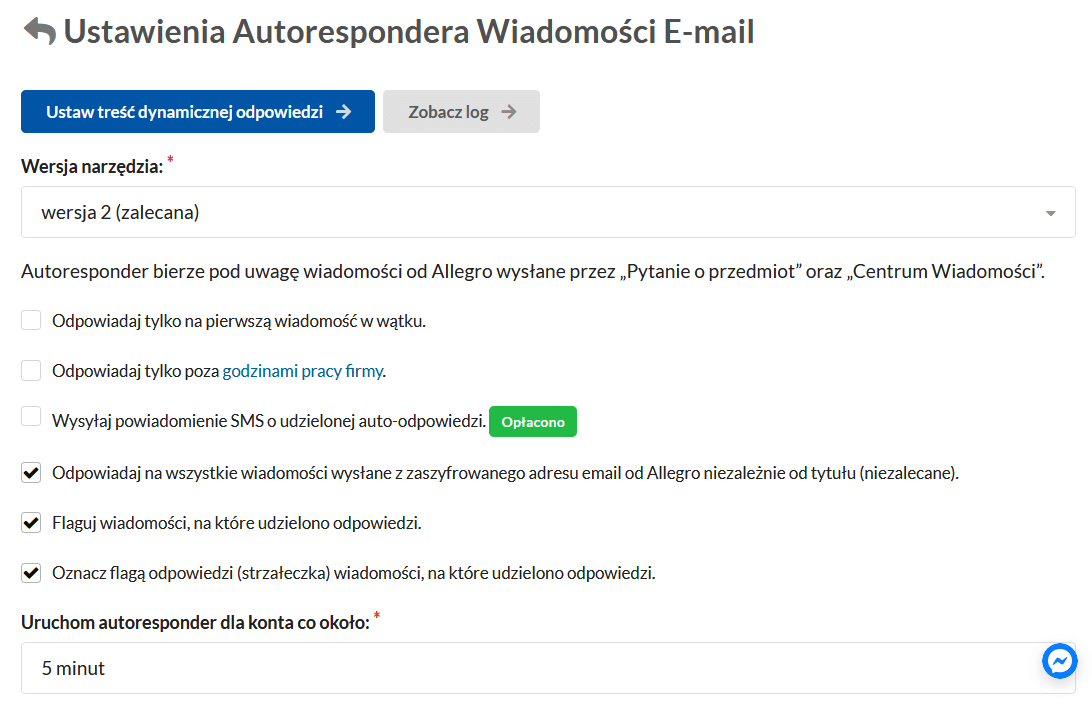
- By default, Email Autoresponder replies to every new message unless you enable a custom subject-phrase filter.
- You can add as many email accounts as you want.
How it works
- Email Autoresponder replies to new messages received by connected email accounts.
After sending a response via the Autoresponder, the message remains marked as unread so that you can respond to it. A flag/star next to the message informs you that the Autoresponder sent an automatic message. You also see this in the reply history in your mailbox. - Optionally, you can limit replies to messages whose subject line contains one of the phrases configured in Email Autoresponder settings.
After enabling the filter, enter your own phrases in the tool settings. - The Autoresponder does not respond to messages sent from an email address to which the Autoresponder has already sent a message in the last hour.
- Limiting the number of replies to the same address prevents an autoreply loop when the sender also uses an autoresponder.
- The tool checks for new messages in your mailbox approximately every 5 minutes.
Email autoresponder
Benefits of Email Autoresponder:
- more frequent mailbox checks - approximately every 5 minutes,
- processing new messages received by connected inboxes,
- a more intuitive way of operating,
- resistant to read messages without a response - a message will also be sent to such,
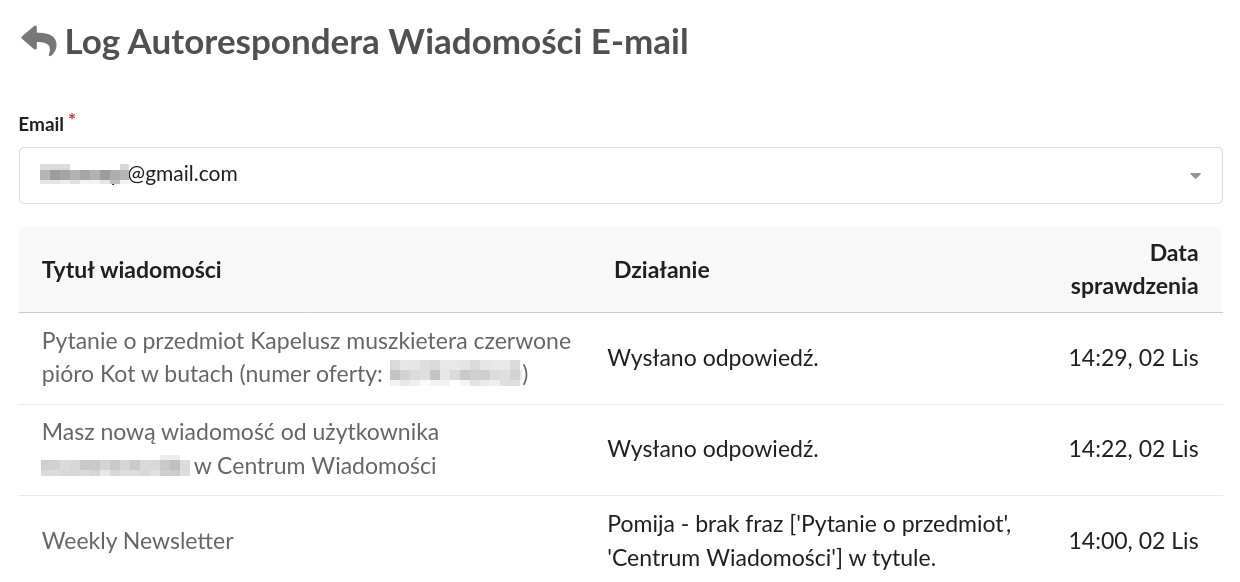
- record of the Autoresponder's actions available on the tool's log page.
- highlighting messages in the mailbox.
- additional protection against auto-response loops - limit responses to the same email address (3 per 24h),

Extensive Email Autoresponder configuration
Jeśli reguły na serwerze rozdzielają pocztę, autoresponder może sprawdzać kilka folderów tej samej skrzynki IMAP. W integracjach poczty przy zapisanym koncie kliknij „Ustaw foldery”, zaznacz np. Odebrane i Pytania klientów, a następnie wybierz „Zapisz foldery”. Zaznacz osobno każdy potrzebny podfolder. Te same foldery odczytuje Komunikator eCommerce.
Ability to set dynamic responses
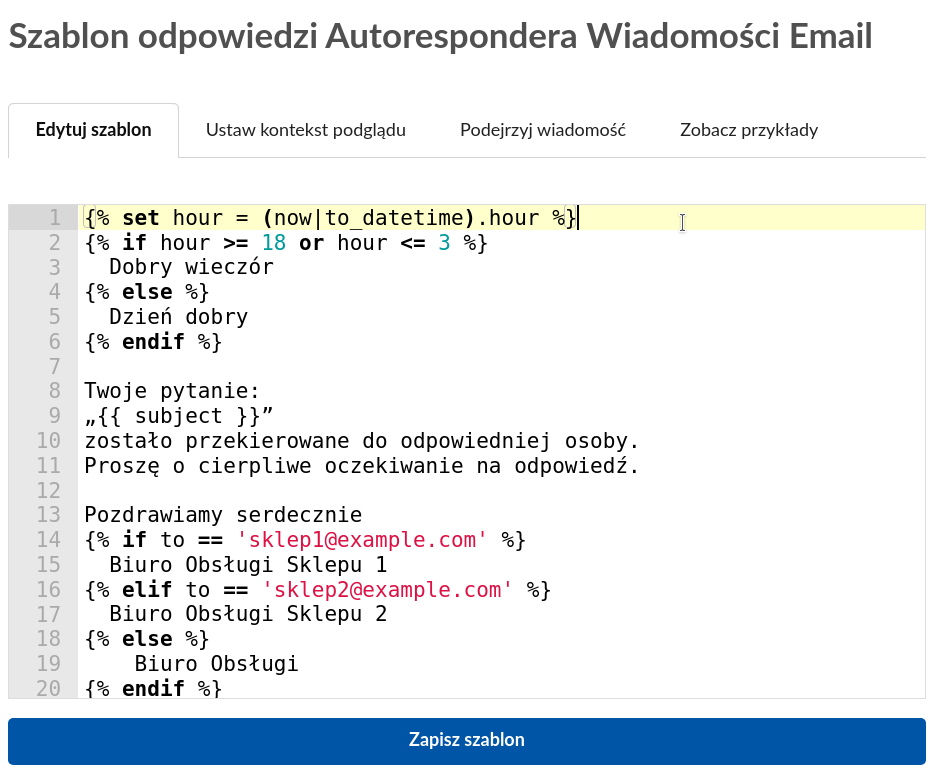
With message templates, the content of the autoresponder's responses can depend on:
- recipient's email address,
- sender's email address,
- the current hour (e.g., in the evening hours, greet with 'Good evening'),
- message content (e.g., if the content includes the word "complaint", you will describe the complaint process in the response),
- message title,
- detected language of the message,
- we will soon expand the response context with additional variables.
Of course, if you don't need automation of responses on your behalf, you can use regular static content.
Your data is treated with great seriousness by us. We apply a high level of privacy security for Users at every level of our operations.
For Email Autoresponder, we also encrypt passwords for connected email accounts and never display them in the browser. Message content is not stored in our system, except for the subject of the message that received a reply, to make it easier for you to monitoring the Sales Assistant's activities.
Nevertheless, we recommend connecting a specially created email account to which you will forward only a portion of messages (e.g., questions from Buyers).
In the case of Gmail accounts, Google occasionally sends security alerts. You should then check the activity IP that Google informs you about.
Our server's IP is 51.83.203.182.
We do not save messages to disk, but check them on the fly. In case of sending a response or skipping a message, we log the sender's email address, the subject, and the time of the message for you to verify the tool's correct operation.
FAQ — Frequently Asked Questions
You can find the current cost of the tool in our pricing.
After purchasing the tool, you can connect an unlimited number of mailboxes to it.
Yes. The tool works through your connected email accounts, reading messages via IMAP and sending replies via SMTP.
- Create a free account with Niezbędnik Sprzedawcy.
- Connect email accounts in Email Account Settings.
- Enable the Email Autoresponder feature in Sales Assistant settings.
- You can change the default response content in tool settings.
- In Email Account Settings click the button Add mail account.
- Enter the email address of the mailbox being added and the access password for this mailbox.
- If the IMAP and SMTP fields were not automatically filled in, check with your email provider how to configure these parameters.
- Click the "Test connection and save" button.
For Gmail, it will also be necessary to:
- Enable IMAP in Gmail Account settings.
- Enable access for less secure apps.
- Confirm device recognition in the connection block notification from Google.
- If an incorrect password is provided and the Gmail account is locked, access must be unlocked here.
If you have multiple connected accounts on Gmail, to ensure you are configuring the correct account, we recommend setting up the account in private mode of the browser (incognito).